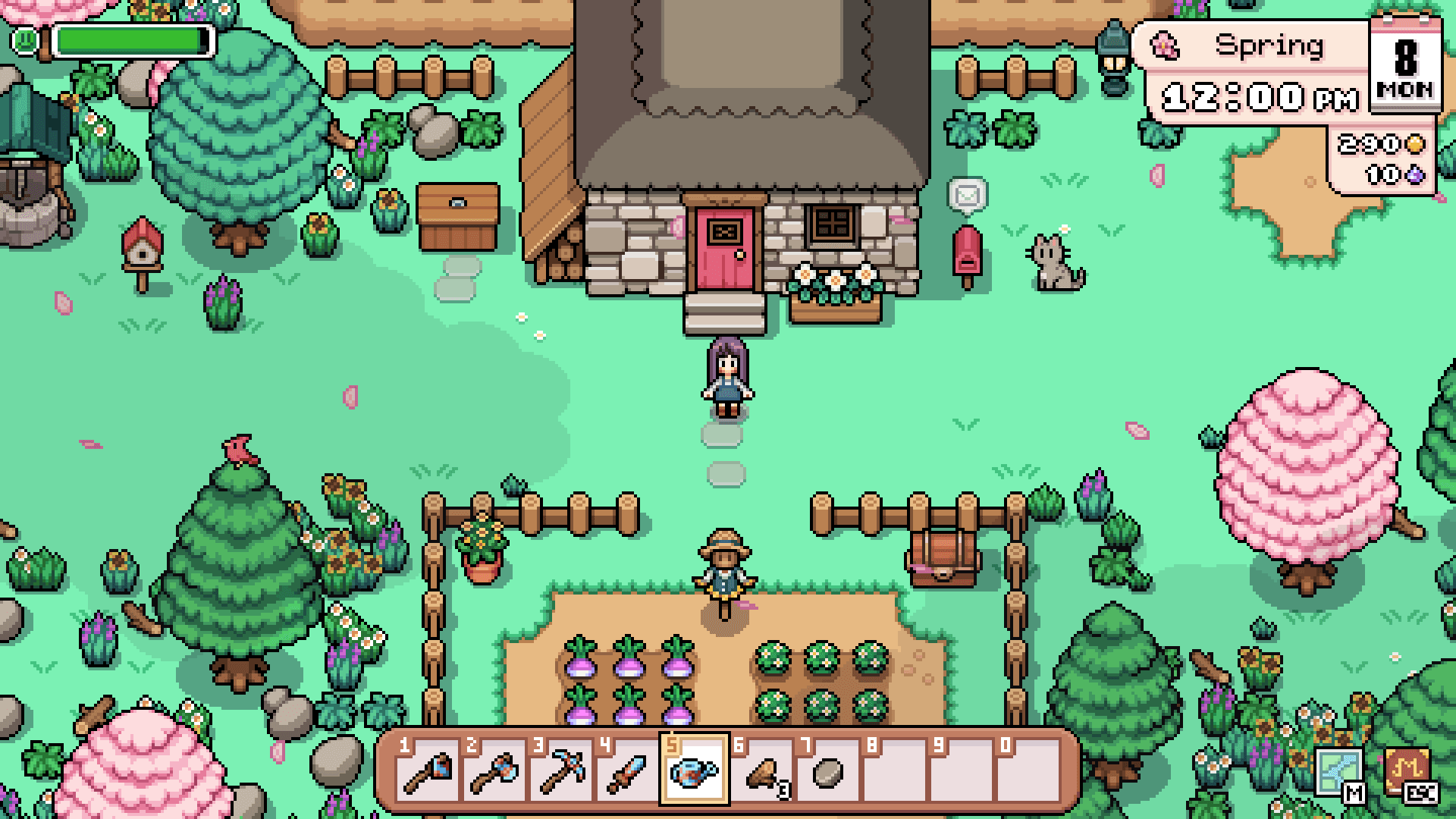
This is an unofficial fan guide. Community videos and third-party planning tools are useful references, but verify current game behavior before changing your farm.
A practical Fields of Mistria farm layout starts by reserving zones for large buildings, crop plots, paths, and decoration before you commit materials in your save. NPC Studio's Steam page confirms that the home and farm can be customized, but the official sources collected for this guide do not provide a grid map, tile dimensions, or a single required layout. That means the best plan is one that matches your current tools, buildings, and preferred look rather than a copied arrangement. Exact farm dimensions and any current placement limits are To be confirmed from current in-game information.
Start with the farm zones
Divide the farm into a few broad uses before placing individual objects: a building and animal area, crop fields, storage and work space, paths, and decorative space. A community farm-layout video recommends choosing positions for large structures first because they take the most space, then keeping nearby crop fields in mind. That is player advice rather than an official rule, but it provides a useful order for a first draft. Leave some unassigned space so later buildings or furniture do not force an immediate redesign; exact building footprints and collision rules are To be confirmed.
Place buildings before the small details
Community guidance recommends deciding where a barn, coop, greenhouse, or future equivalent will go before laying decorative paths or filling every open tile with crops. It is easier to build paths around a known landmark than to tear up a finished decorative area later. The recorded video also recommends planning for structures you have not unlocked yet, so a farm can grow without losing its main routes. Treat that as an adaptable design habit, not evidence of a fixed unlock order, and verify current relocation costs, restrictions, and construction requirements in-game because they are To be confirmed.
Plan crop fields around the work you do
Crop plots are easier to manage when they connect to a path and sit near the storage you use during daily work. A community video describes putting fields near the animal area in one example layout, while another describes keeping a crop chest in the garden for convenience. The archive also records a claim that water sprite statues can water in a two-tile radius, but it is version-specific community information rather than current official guidance. Start with a field size you can water comfortably; current watering ranges, statue behavior, and unlock conditions are To be confirmed.
Draw paths for movement and visual structure
Paths give a layout structure even before it has much decoration. A community creator recommends connecting the farm exits and then using an additional route in front of the house to divide the space, while noting that paths do not need to be perfectly straight. The same video says dirt paths can be made with a shovel and that a higher-quality tool may let the player work on multiple tiles at once. Use your own map view as the authority for entrances and routes, because exact path costs, energy use, and exit layout are To be confirmed.
Leave room for an orchard and grazing
An orchard works best when you account for tree spacing before surrounding it with furniture. One community farm-layout video says there are seven fruit-tree types, that each needs a 3-by-3 area to grow, and that fruit trees do not need watering; another warns that fruit trees cannot be retrieved after placement. The same research advises retaining enough grass for animals that graze outdoors, but not using a creator's personal pasture example as a universal calculation. Tree spacing, grazing consumption, grass growth, animal capacity, and grass-starter requirements are To be confirmed.
Build decoration in layers
Once routes, buildings, and growing areas feel right, add fences, furniture, lighting, and smaller ground details. Community creators describe fences as a way to separate areas and suggest that path materials, pebbles, grass blades, and flowers can create a less empty-looking farm. Their transcripts list shops, museum rewards, mine chests, a Saturday market, cooking challenges, town-rank rewards, carpenters, and a general store as furniture or recipe sources. Current furniture sources, placement permissions, stacking behavior, and shop stock are To be confirmed.
Match the house plan to the farm plan
The Farmhouse community-wiki page identifies the farmhouse as the player's home on the farm and says its furniture, flooring, and wallpaper can be changed. It also reports that house upgrades are bought from the Carpenter with materials and a set price, and that the upgrade takes effect immediately rather than after a wait. The source's table lists four upgrades, beginning with an expansion from a 13-by-8 room to 17 by 12, followed by added rooms and eventually a second story. Use those figures as community-wiki reference material, not as a replacement for the current Carpenter menu.
The same table records costs and materials for each tier, including wood, stone, ingots, hard wood, and refined stone. It also associates the fourth upgrade with the Upgrade the Carpenter's Shop story quest. Prices, materials, room dimensions, and prerequisites can change with patches, so do not plan a budget from an archived transcription alone. Current farmhouse tiers and upgrade requirements are To be confirmed in-game before you collect materials for a specific purchase.
Test ideas with a third-party planner
The Mistria Planner is a third-party interactive layout tool, not an official NPC Studio resource. The collected research says it can switch seasons and house-upgrade levels, show the grid and collisions, search crops and furniture, and represent states such as wet soil and fruit-bearing trees. It stores layouts locally in the browser and supports JSON export and restore, which can make it useful for comparing versions of an idea before changing a live farm. Review the planner's current interface and any data-handling information yourself before importing or exporting a layout.
Use a planner to test broad choices first: where the main routes run, how much room remains after buildings, and whether a crop or orchard zone interrupts access. Then check the same idea in-game before treating it as final, because a third-party tool may not reflect a newly patched object or rule. The research record specifically notes that official sources did not provide a farm grid or tile constraints, so neither a screenshot nor a planner should be presented as official map data. Current planner accuracy and coverage are To be confirmed.
A practical layout checklist
Clear a small working area, choose your major zones, and place or reserve space for large buildings before filling the farm with decoration. Add a simple path network, then test a normal day of watering, harvesting, animal care, and travel through the routes you created. If a zone feels inconvenient, adjust it before committing additional furniture or hard-to-replace plants. A community creator recommends clearing debris to see the farm as a blank canvas and using a wider camera view for planning; both are optional workflow suggestions.
Keep a short note of what is based on your own current save versus an older community source. Screenshots and videos are excellent for inspiration, but their versions, tool states, and unlocks may not match yours. The official Steam page supports the central idea that the home and farm are customizable; the exact layout mechanics must be checked where you play. That distinction lets this guide offer practical ideas without inventing a universal best farm layout.
Sources and review note
This page uses NPC Studio's Fields of Mistria Steam page for the confirmed customization statement. It uses the Farmhouse community-wiki page, the third-party Mistria Planner, and two archived YouTube transcripts for additional, clearly attributed planning context. The research archive was collected in August 2026, but the supplied video records do not include channel names, publication dates, views, or durations. Those missing video details and any facts affected by later game updates are To be confirmed before relying on them as current instructions.